WITHDRAWALS
You decide when dollars become pesos.
Pesos land in your bank in seconds, 24/7, by SPEI in Mexico and InstaPay in the Philippines.
Pesos and reais over the rail your bank already uses.
Mexico
- Via
- SPEI
- Currency
- MXN
- Timing
- Seconds, 24/7
Philippines
- Via
- InstaPay, or PESONet for larger amounts
- Currency
- PHP
- Timing
- Seconds, 24/7 by InstaPay
Brazil
- Via
- Pix
- Currency
- BRL
Also: euros over SEPA, pounds over Faster Payments, and dollars to a US bank over ACH.
You see the numbers before anything moves.
01Amount
Choose the amount
Enter what you want to leave your account, or the amount you want to land in your bank. Oncade works out the other side.
02Rate
See the rate and the fee
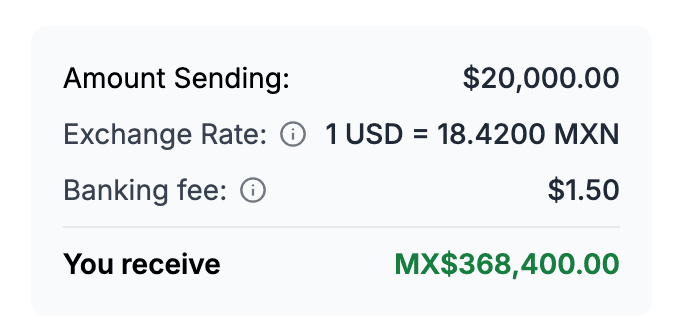
The exchange rate, the fee breakdown and the amount that lands, on one screen.
03Confirm
Approve the exact amount
The money goes out on the local rail.
04Record
Keep the receipt
Each withdrawal gets a receipt with the rate, the fee, the rail and a transfer ID, and shows up in your monthly statement.
Decide when to convert.
Hold US dollars.
Keep them in USD for as long as you want.
Your timing, your amount.
Withdraw what payroll needs this week, or more when the rate looks right to you.
Made for the person who signs off.
- 01
Admins only
Only admins on your business can send a withdrawal.
- 02
Invoices attached
Link the paid invoices a withdrawal came from. They travel with it, so it is less likely to be held for review.
- 03
One history
Every withdrawal in one list with its status, rail and the amount that landed.